
Cloud text-to-speech is priced like a luxury. ElevenLabs charges around $100 per million characters, and a full novel is easily 500k to 900k characters. Narrate ten books from your own shelf and you are approaching a thousand dollars for audio you cannot even keep private, because every word travels to someone else's server first.
The counterpoint arrived quietly over the past year or two. Open-source TTS models now run on a consumer NVIDIA GPU. They clone a voice from well under a minute of reference audio with zero training. And they cost electricity.
I wanted to know whether that counterpoint holds up in practice, not in a demo script that synthesizes one paragraph, but in something I would actually use. So I built EPUB2Voice: a private, self-hosted web app that turns DRM-free EPUB ebooks into fully narrated audiobooks, with the AI voice models running entirely on my own hardware, voice cloning from a short WAV sample, and one-click MP3 export so the result plays in any audiobook app on my phone.
It joins the small family of private tools I keep building for myself, alongside MyAwesomeMixtape, Earshot and the content calendar. The pattern is the same every time: a thing I want to exist, running on my own machine, with my data staying mine.
The thesis I came away with, and the reason this article exists: the interesting engineering is not the AI model. It is everything around it.
What it actually does
The flow from the outside is simple. Upload an EPUB. The app parses it into chapters. Pick a voice, or create one by uploading a short recording. Queue the chapters you want. Come back later to a narrated book you can listen to in the browser, with a read-along view that highlights each word as it is spoken, or export as a single MP3 and drop it into your audiobook app.
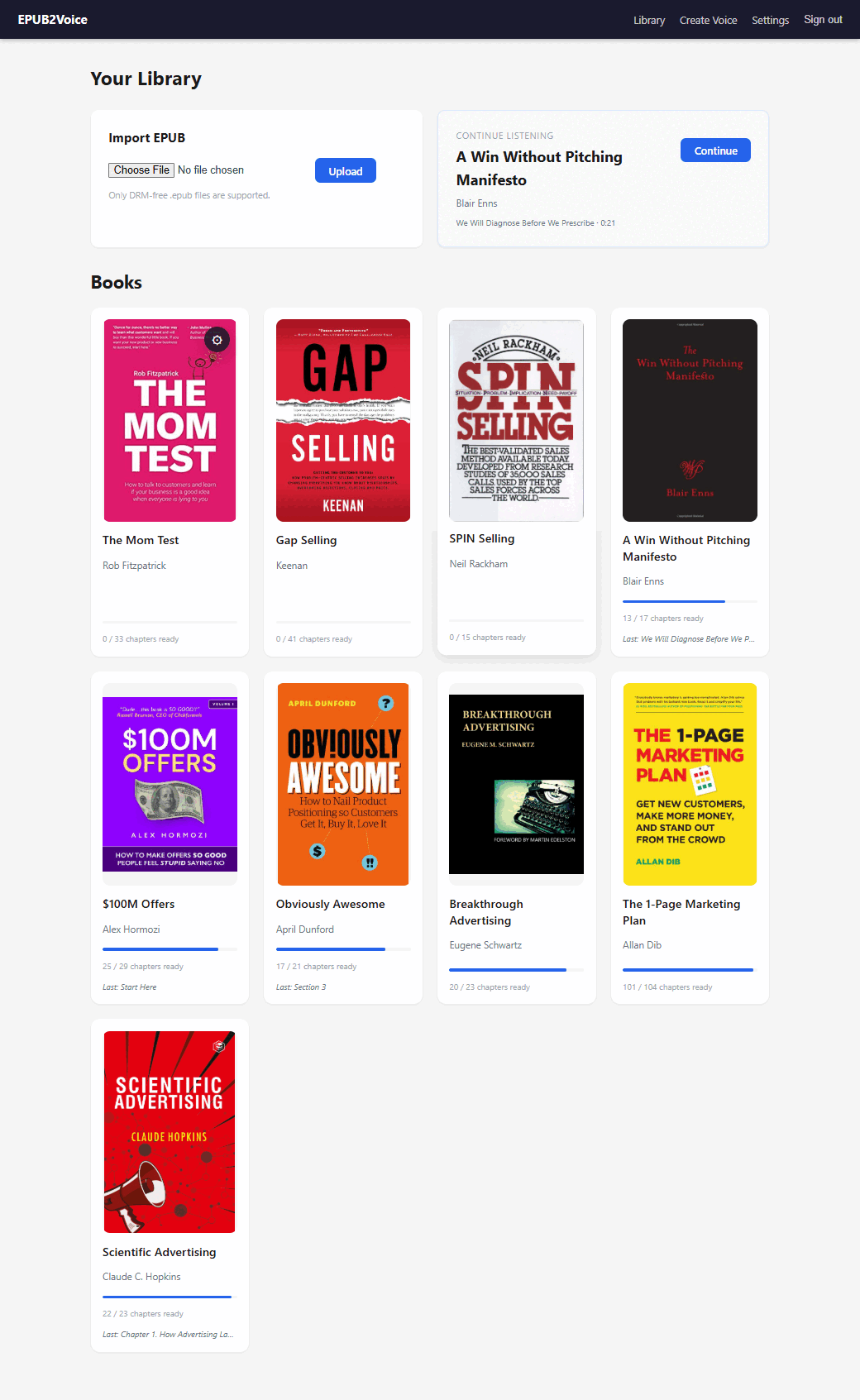
The library. Per-book progress is the number that matters - "17 / 21 chapters ready" is a book you can already start listening to.
Underneath that simplicity is a pipeline with eight distinct stages, a durable job queue, four different TTS engines, one deliberately isolated worker process, and a set of small text-shaping decisions that turn out to matter more than the model choice. That underneath is what I want to walk through, because a reader with intermediate Python and web experience should finish this piece able to build their own version.
The pipeline, end to end
The stack is deliberately boring: Python with FastAPI, SQLAlchemy on SQLite, server-rendered Jinja2 templates with vanilla JavaScript and CSS. No frontend framework. It runs on localhost behind a simple session login, and everything, books, chapters, jobs, settings, audio, persists across restarts. Boring is a feature here. The exotic part of this system is the audio synthesis, and I wanted everything around it to be as unremarkable as possible.
Parsing. The EPUB parser is ebooklib plus BeautifulSoup. It validates the mimetype, walks the spine in reading order, and extracts text from the content tags that matter: headings, paragraphs, list items, blockquotes. It skips navigation documents and the low-value front matter every ebook carries, the cover page, the copyright block, the dedication, matched by title. Sections under five words get dropped. Each chapter is stored with its word count, and the cover image is extracted when the EPUB exposes one.
None of this is glamorous, and all of it determines whether the audiobook starts with chapter one or with ninety seconds of legal boilerplate read aloud in a cloned voice.
Configuring. The book page lists chapters with word counts and a text preview per chapter. Settings choose the active TTS provider and the default voice and speed. Every voice has a Test button that synthesizes a short preview, because committing a whole book to a voice you have not heard is a mistake you make once. Defaults are remembered per book, and both provider and voice can be overridden per chapter.
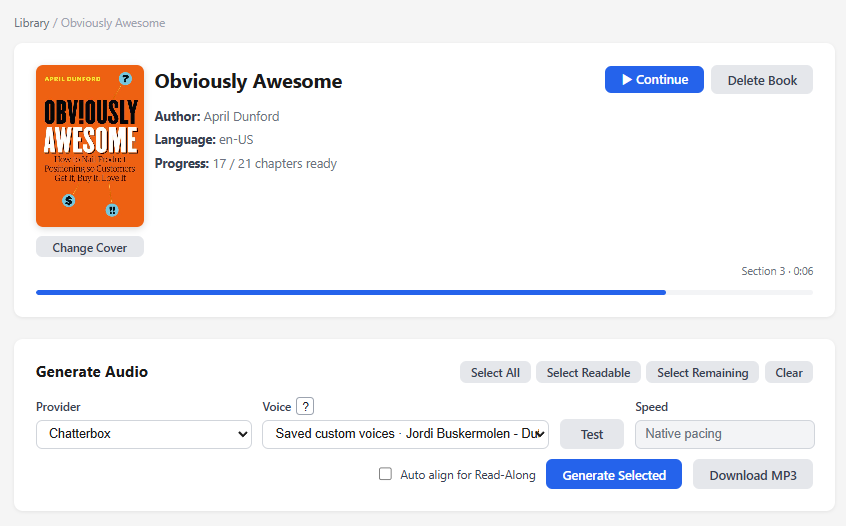
Provider, voice and speed, plus the chapter selection. "Select Remaining" is the button I press most - it queues everything not yet narrated.
Queueing. Generating a chapter creates a GenerationJob row in SQLite: queued, running, then ready or failed. A background thread drains each book's queue sequentially. The part I would defend hardest in this design: the runner slot is a durable database row, not in-memory state. If the app crashes or restarts mid-book, startup logic detects orphaned jobs and resumes the queue where it left off. Transient errors retry automatically with a backoff delay. Permanent failures surface per chapter with a manual retry button. The whole queue can be stopped and cleared through a cancel event at any time.
This is the queue-and-walk-away design, and it exists because local generation takes real time. More on that in the limitations, where it belongs.
Text shaping. Before any synthesis happens, the chapter text is deterministically shaped, and this small step is a disproportionate share of why the output sounds like an audiobook instead of a text dump. The chapter title is separated from the body and given a provider-tuned pause after it, somewhere between 620 and 720 milliseconds depending on the engine. The first sentence of the body gets a shorter lead-in pause. A duplicated heading at the start of the body, which EPUBs love to produce, is stripped.
Read that paragraph again and notice there is no AI in it. It is pause lengths and string handling. A human narrator breathes after a chapter title, and a listener notices when the machine does not, even if they cannot say what is wrong. The difference between "impressive tech demo" and "thing I actually listen to on a walk" lives in details of exactly this size.
Synthesis. Local models have limited context and degrade on long inputs, so text is split into sentence-aware chunks of roughly 280 characters. Each chunk is synthesized separately, and the float-audio chunks are concatenated into one WAV with the shaped pauses inserted at the seams.
Encoding. ffmpeg converts the WAV to MP3 for size and universal playback. Files are named from slugified book and chapter names, and startup runs migration and cleanup passes for stale or renamed audio, because a tool you use for months accumulates history a demo never has to deal with.
Listening. Playback happens in the browser, with sequential play across ready chapters, or the entire book downloads as a single stitched MP3. That download is the payoff moment: drop it into your audiobook app of choice on iPhone or Android and the self-hosted machinery disappears behind a file that plays anywhere.
Four engines instead of one
The app speaks to four TTS providers, and the plural is deliberate.
- Kokoro - local, ONNX Runtime. Fast, lightweight default narration.
- Qwen3-TTS - local, PyTorch/CUDA in an isolated worker. Higher-quality named voices, nine native voices, multilingual.
- Chatterbox - local, PyTorch/CUDA. Zero-shot voice cloning.
- ElevenLabs - cloud, opt-in, REST API. Optional premium tier.
Kokoro is the workhorse: light enough to be the CPU-friendly fallback, fast enough that testing a voice takes seconds. Qwen3-TTS brings the higher-quality named voices. Chatterbox, the open-source model from Resemble AI, is the reason the project exists, because it does the cloning. And ElevenLabs stays available as an opt-in tier, the one path where text leaves the machine, because honesty requires admitting it still wins on some material.
One engineering decision here deserves its own section, because the pattern is reusable far beyond this project.
Isolating the heavy model in a worker process
Qwen3-TTS has dependencies that conflict with the main application. The usual answers to that are dependency archaeology or containers. I took a third path: the model runs as a long-lived worker subprocess in its own virtualenv, and the main app talks to it over stdin and stdout with JSON messages. Its noisy startup warnings get filtered before they reach the logs.
The worker starts once and stays warm, so there is no model-loading cost per chapter. The main app's environment stays clean. A crash in the worker cannot take the app down. And the pattern generalizes: any heavy model with hostile dependencies can live behind a subprocess boundary with a JSON protocol, which is considerably less machinery than a container orchestrator for a tool running on one machine.
A related guard: the local providers share a single generation slot, so two GPU models can never load simultaneously. One consumer GPU, one model at a time, enforced structurally rather than by hoping the queue behaves.
Voice cloning from under a minute of audio
This is the part people doubt, so let me be precise about what happens.
You open Create Voice and upload a clean reference recording, a WAV, or an MP3 that gets converted through ffmpeg. The file is content-type validated and size-capped. The app synthesizes a short preview so you hear the cloned voice before committing to it, then saves the result as a named, reusable voice profile, a file on disk plus a database row, addressed internally as custom:slug.
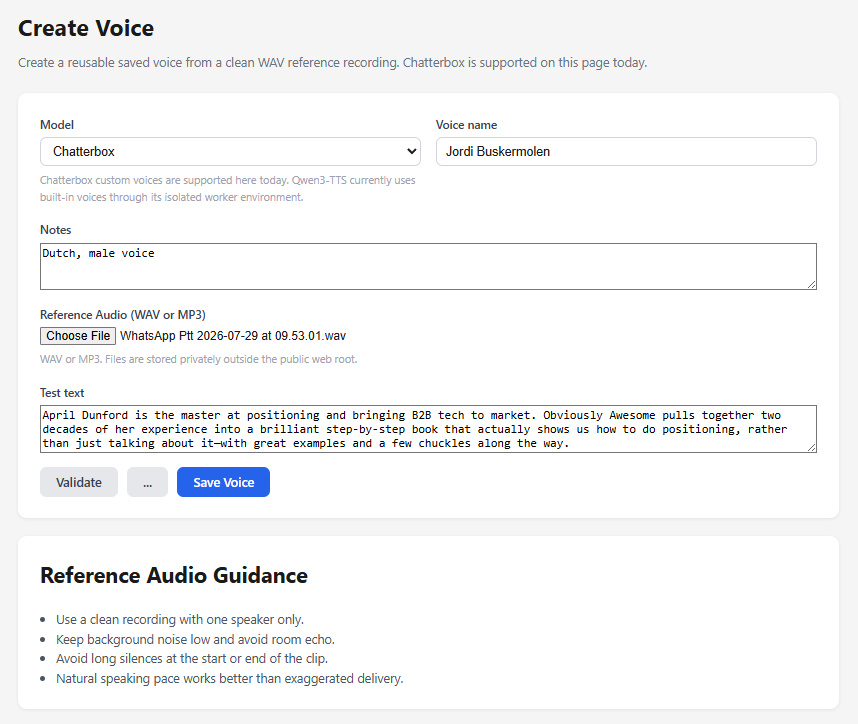
The entire cloning interface. The reference recording here is a WhatsApp voice note of me talking for about forty-five seconds - no studio, no training step.
At generation time, Chatterbox does zero-shot cloning. No training run. No fine-tuning. No GPU-hours of preparation. The model conditions on the reference audio during synthesis, and that is the entire mechanism. Under a minute of clean speech is enough to narrate a full book in that voice.
The aside that made me smile when I learned it: Chatterbox is built on a roughly half-billion-parameter Llama backbone. "A local LLM that clones voices" is more literally true than it sounds.
One paragraph on ethics, because it is not optional in a piece like this: clone your own voice, or a voice you have explicit permission to use. The technology does not enforce that boundary. You do.
The read-along player
The newest addition runs after generation rather than during it. A WhisperX forced-alignment job, in its own background queue, takes the finished audio and the chapter text and produces an align.json of word-level timestamps next to the MP3, each entry a word with its start and end time.
Those timestamps power a read-along player that highlights each word as it is spoken. It is the feature I did not plan and now use constantly, and it cost almost nothing to add because the pipeline already had the two ingredients, the audio and the source text, sitting next to each other with a queue pattern ready to reuse.
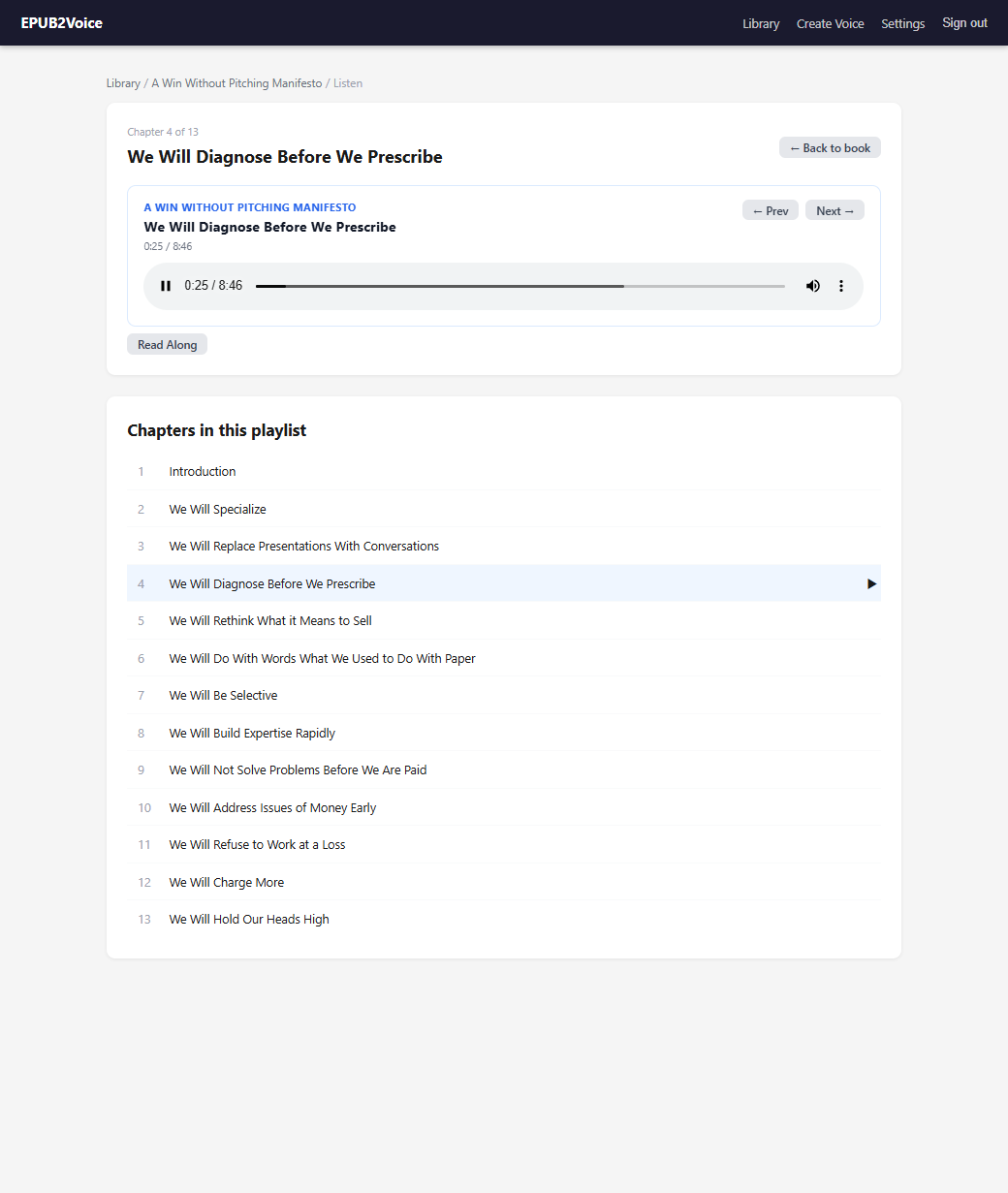
The listening view. Sequential playback across chapters, with the Read Along toggle for the word-level highlighting.
Honest limitations
A piece like this is worthless without the other side, so here it is.
You need an NVIDIA GPU for Qwen3-TTS and Chatterbox. Kokoro is the CPU-friendly fallback, and it is good, but the cloning path is GPU-only.
Generation is slower than a cloud API. A full book takes real time, which is exactly why the queue is durable and the design assumes you walk away. This is a tool for people who plan an evening ahead, not for instant gratification.
DRM-free EPUBs only. The parser does not, and will not, touch protected files.
And local quality, excellent as it is, still loses to ElevenLabs on some material. That is why the cloud tier remains as an opt-in rather than being deleted in a fit of self-hosted purity. The point of this project is not that cloud TTS is bad. The point is that the default has flipped: local first, cloud when a specific book earns it, instead of cloud always because there was no alternative.
The cost accounting, then, honestly stated: the cloud price for a bookshelf is hundreds of dollars and your text on someone else's server. The local price is a consumer GPU you may already own, real generation time, and electricity.
The self-hosted thesis
EPUB2Voice is the latest entry in a series of tools I build for one user, on one machine, with no account system beyond a login page and no data leaving the house unless I explicitly send it. Each one starts the same way: a recurring want, a look at what the subscription version costs in money or privacy, and a weekend that turns into three.
What this one taught me is the thesis I opened with. The models are the easy part now. Kokoro, Qwen3-TTS and Chatterbox all work, and swapping between them is a settings page. The real work was the durable queue, the crash resume, the pause after a chapter title, the 280-character chunks, the worker process with its JSON protocol, the cleanup passes for renamed files. The unglamorous 80 percent.
That is worth sitting with, because it generalizes past audiobooks. The capability is increasingly a commodity. The system around the capability, the part that makes it survive restarts, handle failure, and sound right at the seams, is where the actual building happens. The model is not the product. The product is everything you wrap around it so the model can quietly do its job.
Hear it
Rather than end on a claim, here is the output. This is my own voice, cloned by Chatterbox from a short reference recording and generated locally on my GPU. I never read these words aloud:
The passage is a short excerpt from Obviously Awesome by April Dunford, copyright the author, included here solely to demonstrate narration quality. Buy the book - it is the best thing written on positioning. Rights holders who would prefer this sample removed can reach me at jordi@yellowhousedigital.com and I will take it down.
To be explicit about the tool itself: narrating a book you own, in your own voice, for your own listening is a private format-shift. EPUB2Voice does not distribute anything, and the generated audio never leaves my machine unless I put a thirty-second clip like this one in an article.
That is the whole argument in half a minute. No training run, no cloud API, no per-character invoice. A reference clip, a consumer GPU, and the unglamorous 80 percent around the model.
EPUB2Voice runs on my own hardware and is not a client project. The other tools in this series: MyAwesomeMixtape, Earshot, and the content calendar.